
By: Tim O’Pry | Chief Security Officer
My favorite password manager has been found to have (another) vulnerability. Fortunately, this one has already been fixed and if you have auto-updates enabled, it was fixed before the bad guys likely had a chance to find out about it.
More details on the vulnerability here.
What should you do?
Check your LastPass version number. To do that, LEFT click on the LastPass icon on your browser toolbar, then select: ‘Account Options’ and then select ‘About’. A webpage similar to the following should appear:
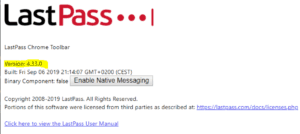
If your version number isn’t 4.33.0 or HIGHER, you need to update LastPass. According to LastPass, all browser plugins are updated automatically by default, so if yours did not update try removing and re-adding the browser plugin.
While it’s always disappointing when a tool I use (and recommend) has a security issue, this is the unfortunate reality we live in—NOTHING is 100% secure. I am heartened by the fact that it was fixed quickly and apparently before any reports of abuse (yet), but just further evidence why all of us should follow the Top 3 Things to DO and NOT DO (ooh, those videos are painful. My momma always told me I had a face for radio).
https://henssler.com/cybersecurity-101/
https://henssler.com/cybersecurity-102/
Sim Swapping: How crooks steal your phone number
Even if you have secured your phone with the most advanced security options available, your phone number can still be taken from you (but fortunately not the data ON your phone). The scam is called SIM swapping, and basically it is a scam where the crooks fool a customer service rep at your phone provider into thinking they are you and you (I mean they) lost their phone and need to register their new one as yours!
Once they transfer your phone number to their phone, they can use it to steal other accounts where the verification is to send a text to your (their) phone number.
This hack has been around for many years, and while the major carriers have added a form of secondary identification, few people are aware of it—and even worse, the representatives sometimes don’t follow their own policies and still fall prey to this scam.
For more information, read this article and then logon to your cell carrier account and enable whatever secondary protection they may provide.
As a Henssler client, should you have a cybersecurity-related question or concern, we are here to help! Contact us at cybersecurity@hensslerfinancial.com, or through your associate.
Disclosures: The investments referenced within this article may currently be traded by Henssler Financial. All material presented is compiled from sources believed to be reliable and current, but accuracy cannot be guaranteed. The contents are intended for general information purposes only. Information provided should not be the sole basis in making any decisions and is not intended to replace the advice of a qualified professional, such as a tax consultant, insurance adviser or attorney. Although this material is designed to provide accurate and authoritative information with respect to the subject matter, it may not apply in all situations. Readers are urged to consult with their adviser concerning specific situations and questions. This is not to be construed as an offer to buy or sell any financial instruments. It is not our intention to state, indicate or imply in any manner that current or past results are indicative of future profitability or expectations. As with all investments, there are associated inherent risks. Please obtain and review all financial material carefully before investing. Henssler is not licensed to offer or sell insurance products, and this overview is not to be construed as an offer to purchase any insurance products.